STEM simulation software: see pressure, flow, buoyancy and heat
Visaria is real-time physics simulation for Windows, built for STEM learning. Switch physical effects on and off, change the properties of a fluid, and watch pressure, velocity, buoyancy and heat respond live in 3D.
Physics you can change, and watch respond
In a textbook, pressure, buoyancy and heat transfer are diagrams and equations. In Visaria each one is a live experiment. You set up a scene, press run, and the physics plays out in 3D on your own graphics card. Then you change one thing and see exactly what that thing was doing.
It suits school and sixth-form students, university students, teachers, makers, hobbyists and anyone curious about how things work.
That is the idea behind every example on this page: change one variable, watch the response, then change it back. It is how scientists and engineers build intuition, and it is much easier when the response arrives in seconds instead of after a long calculation.
Pressure, velocity and flow
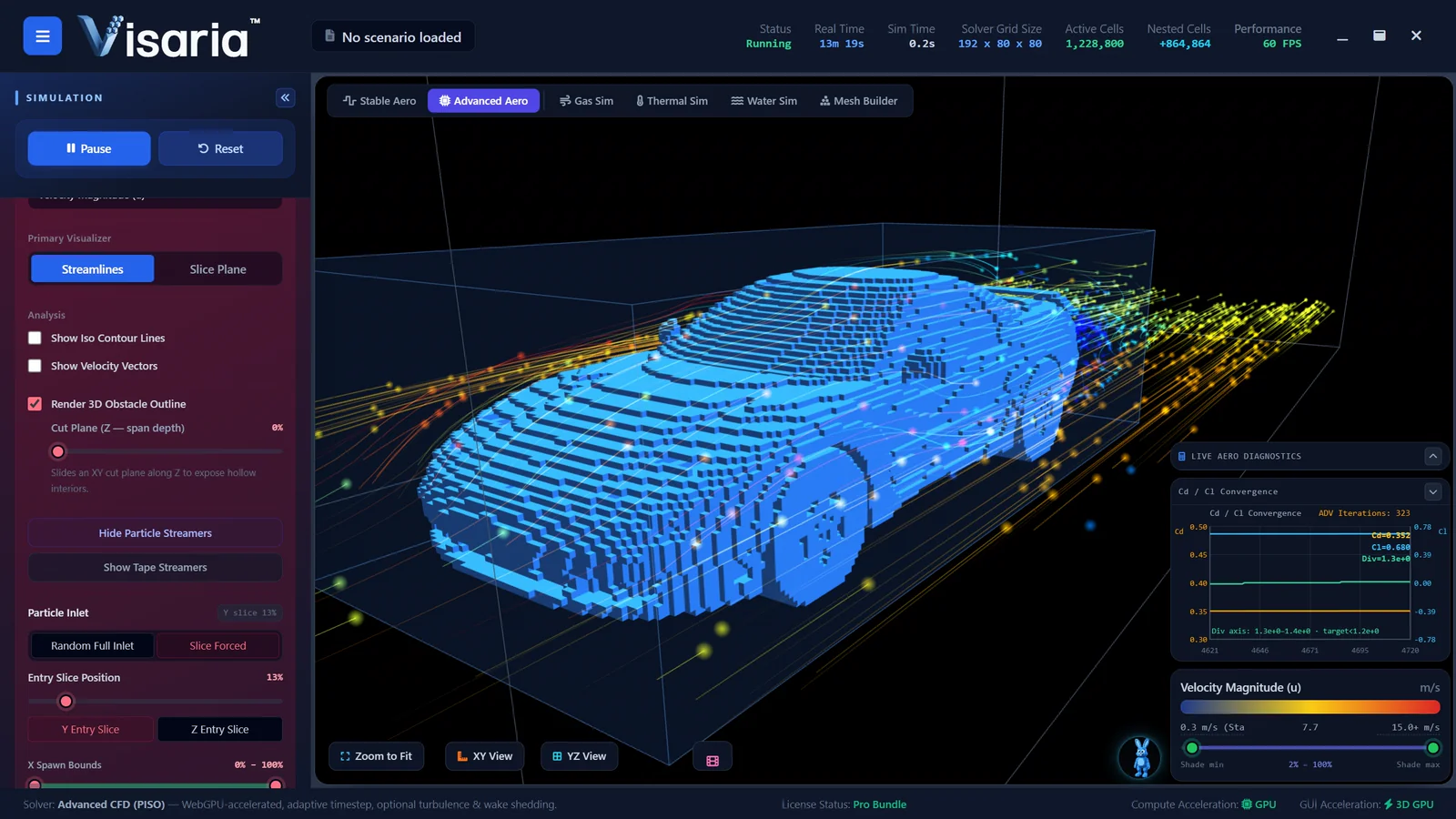
Put a shape in a stream of air and Visaria colours the space around it by pressure or by speed, and draws streamlines that show where the air goes. You can see pressure build up on the front of the shape, the air accelerate around it, the flow separate from the surface and a swirling, turbulent wake form behind.
- Change the speed of the air and watch the pressure and the wake respond.
- Change the shape, from a blunt block to a smooth streamlined form, and see how the wake shrinks.
- Turn on a moving road, which changes the flow beneath a vehicle.
- Read the drag and lift values as the flow settles, as an indication of how the design is behaving.
This is the same idea as a wind tunnel, without the tunnel. See the virtual wind tunnel page for more.
Heat creates buoyancy
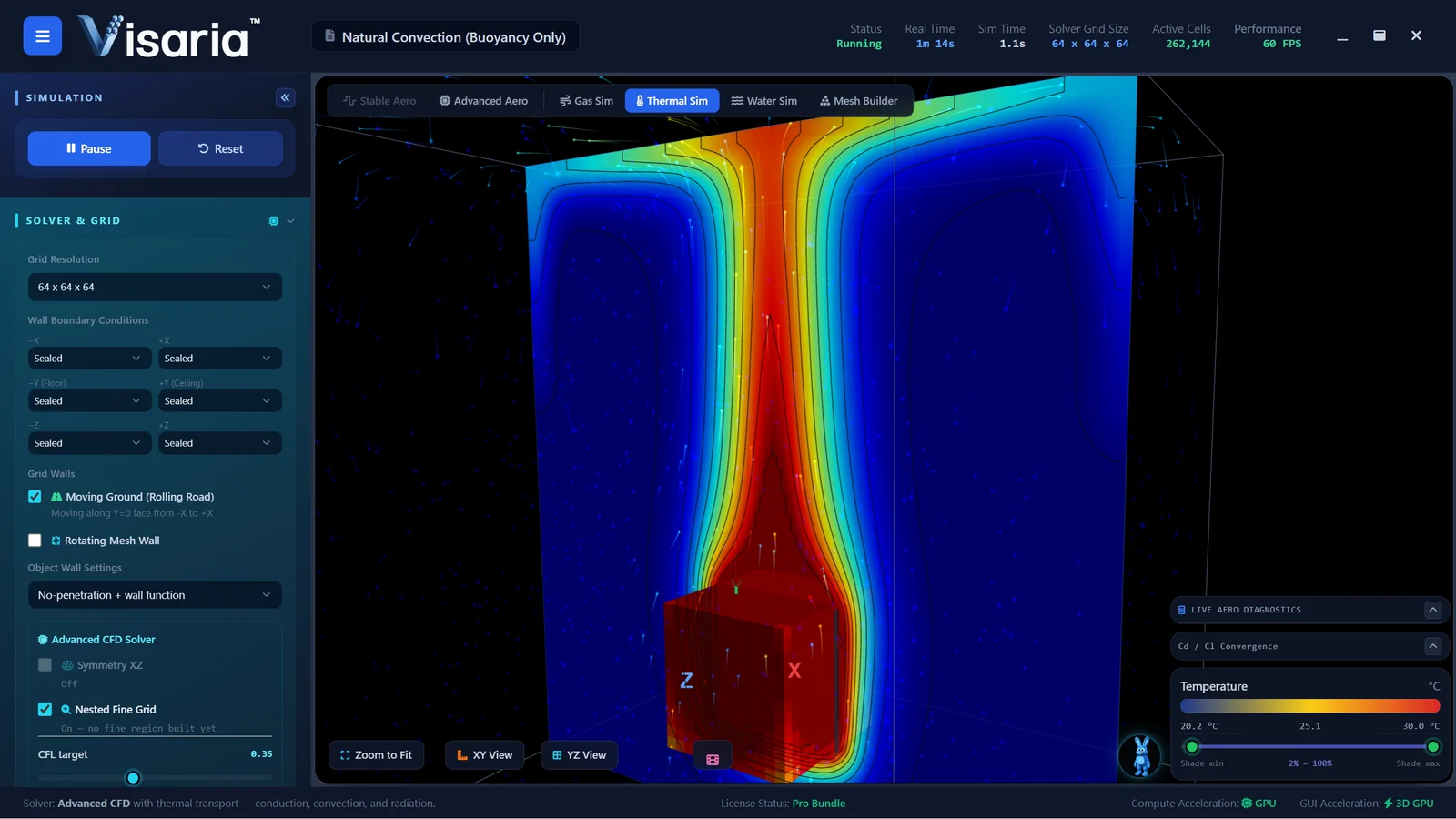
Warm air is less dense than cool air, so it rises. That is why a radiator warms a whole room, why a candle flame stretches upwards and why hot air balloons fly. In the Aero and Thermal solver you can see this happen: place a heated object in still air and a plume of warm air rises from it, drawing cooler air in underneath. Engineers call the result natural convection.
Buoyancy is a physical effect you can switch on and off. With it off, heat spreads through the air only by conduction and by whatever flow you have set up. With it on, the heat drives its own flow, and the whole picture changes. Doing both on the same scene is the quickest way to understand what buoyancy actually adds.
Turn physical effects on and off
Real heat transfer is several effects at once: conduction through solids, convection carried by moving fluid, buoyancy from density differences and radiation between surfaces. It is hard to know how much each one contributes by thinking about it. In Visaria you can turn them on and off in the thermal solver and see the response.
- Conduction only. Heat creeps through the material and the air stays out of it.
- Add convection. Moving air carries heat away, so a fan or a breeze makes a visible difference to temperature.
- Add buoyancy. Warm air now rises on its own, with or without a fan.
- Add radiation. Hot surfaces now exchange heat with their surroundings across the gap.
Comparing the runs shows which effect matters most in a given situation, and why a heat sink has fins. What you see depends on the scenario, so try the same switches on different set-ups.
Gases that rise, and gases that sink
Buoyancy works in both directions. A gas lighter than air climbs and spreads along the ceiling, and a heavier one sinks and pools near the floor. In the Aero and Gas solver you choose a gas, set where it enters and how fast, add some airflow and watch the plume. The Learning Hub topic "how powerful buoyancy is" links to ready-made scenarios.
See gas dispersion simulation for more.
Viscosity changes everything
Viscosity is how much a fluid resists flowing, how "thick" it is. It is easy to define and surprisingly difficult to picture. In Visaria you can change it and watch the consequences: a thin fluid streams quickly around an obstacle and breaks into eddies, while a thicker one moves in smooth, slow sheets and sticks to surfaces for longer. The same experiment works for water and for air, and the shape of the wake, the layers next to the surface and the way the flow settles all change with it.
Try the same scene twice with different viscosities, or with the same fluid and a different obstacle. Water flowing around a cylinder and a set of blocks looks very different from one run to the next, and seeing why is the beginning of understanding fluid dynamics.
Waves, sloshing and free surfaces
The Liquids and Wave Dynamics solver adds a free surface, the boundary between water and air. You can fill and empty containers, set waves moving, watch water slosh and splash against walls, and drop obstacles into it. Waves reflect, interfere and break, which is much easier to appreciate in 3D than in a diagram. See water simulation for more.
Experiments by subject
- Physics, from school science to A-level. Pressure and speed in a moving fluid, forces on a body in a flow, buoyancy, density, wave behaviour.
- Science and heat. Conduction, convection and radiation, natural convection, why materials feel hot or cold, gas behaviour.
- Engineering and design technology. Test the shape of a car, a model rocket, a bridge pier or a heat sink. Bring in an STL file from a 3D printing or CAD program, or build one in the Mesh Builder from simple shapes.
- Maths and computing. How a simulation works: the grid, boundary conditions, convergence and why more detail costs more computing. The CFD for students page covers this.
Structural analysis (FEA), adding forces, stresses and dynamics, is planned as a future solver and is not available yet.
Built to explain itself
Visaria includes a Learning Hub with step-by-step guides that link straight to demonstrations and scenario settings, extensive tool tips, and a searchable glossary and parameter reference. In addition, the "How it works" pages in the app give an overview of how each solver works, the key principles and parameters, and the main care points for getting good results. That makes it suitable for self-directed learning, and for a teacher showing a class what happens when a setting changes.
Honest about what it is
Visaria uses a coarse voxel grid and solvers tuned for real-time use, so its results are indicative. It is built to help you understand how physics behaves, not to produce validated engineering numbers. Do not use it for design sign-off, certification or safety decisions.
Students, teachers and trying it out
The free 7-day trial includes the Aero, Gas, Thermal and Water solvers, with sample access to the Learning Hub, and needs no payment card. Visaria is intended for ages 13 and over. Discounted student licences are available on request for people aged 16 and over in full-time education (a parent or guardian applies and buys if you are under 18). Teachers and lecturers can ask about classroom, lab and department licences at education@visaria.dev. See pricing for the standard plans.
Check the computer first. Visaria runs on Windows and needs a dedicated graphics card: an NVIDIA GeForce GTX 1050 or AMD Radeon RX 560 is the minimum, and an RTX 2060 or RX 5600 XT or better is recommended, with an 8th-generation Intel Core i5 (or equivalent) and 8 GB of memory. Mac and Linux versions are coming soon. The free trial is the quickest way to check that it runs well on your computer. Many school computers do not have a dedicated graphics card, so please try the trial on the actual machine you plan to use. If a desktop computer lacks one, adding a decent dedicated graphics card can cost under $150 and is a good investment: it makes a significant improvement to performance in general, and it lets Visaria shine.
Questions about STEM learning with Visaria
What can students learn from Visaria?
They can see and change pressure, velocity and flow around shapes, buoyancy from heat and from lighter and heavier gases, heat transfer by conduction, convection and radiation, the effect of viscosity, and waves and sloshing in water. They also meet how simulations work: grids, boundary conditions and convergence.
Do students need to know the maths first?
No. Visaria shows the behaviour first and explains the terms as you go, through tool tips, a glossary and Learning Hub guides. Many learners find the equations easier once they have seen what the physics does.
Can a teacher use it for live demonstrations?
Yes. Because the simulation responds as settings change, a teacher can ask the class to predict what will happen, change a setting and show the answer. It runs on a Windows computer with a dedicated graphics card.
Is it accurate enough for school projects?
It is accurate enough to show how the physics behaves and to compare ideas. Its numbers are indicative rather than validated, so describe results as indicative in any report and avoid treating them as measurements.
What age is it suitable for?
Visaria is intended for people aged 13 and over. Students under 18 need a parent or guardian to buy a licence.
Does it cover structures and forces on solids?
Not yet. Structural FEA, covering forces, stresses and dynamics, is planned as a future new solver. Today it covers fluid flow, buoyancy, heat transfer, gases and free-surface water.
Keep exploring
Or see all the features, the Learning Hub and the gallery.
Make the physics visible
The free 7-day trial needs no payment card and includes the Aero, Gas, Thermal and Water solvers.