CFD software for students: see how flow works
Computational fluid dynamics (CFD) is hard to learn from equations alone. Visaria is real-time CFD simulation for Windows that runs on your own graphics card, so you can change a setting and watch the airflow, pressure, heat or water respond straight away.
What is CFD?
Computational fluid dynamics (CFD) uses a computer to predict how liquids and gases move: air over a car, water in a tank, heat rising from a hot surface. The computer divides the space into a grid of small cells and solves the equations of fluid motion in each one, over and over, until the flow settles. Engineers use it in aerospace, automotive, energy and electronics cooling, among many other fields.
If you want to learn CFD, whether you are studying A-level physics, an undergraduate engineering degree or just exploring, the hardest part is getting a feel for what the results mean. That is why CFD for beginners works best when you can see the result straight away. Visaria runs the whole calculation on your computer's GPU (graphics card), which is what makes it fast enough to use as a learning tool, and it is engineering simulation you can start using in minutes.
Why CFD is hard to learn, and what helps
Most students meet CFD as pages of equations (the Navier-Stokes equations, turbulence models, discretisation schemes), followed by a professional package with a long list of settings and a mesh that has to be right before anything will run, and then slowly. It is easy to get a result without knowing what produced it.
What builds understanding is repetition: change one thing, see what happens, change it back. That is difficult when every iteration takes many minutes or hours. Visaria is built around that loop. It solves on your graphics card at interactive speed, so a setting moves and the flow changes while you watch. You still see real physics, such as airflow, drag, pressure, heat, buoyancy and free-surface water, but you spend your time asking questions of a model instead of waiting for it. In addition, the "How it works" pages in the Visaria app give an overview of how each solver works, the key principles and parameters, and the main care points for getting good results.
What you can learn with it
- Aerodynamics. How flow separates behind a shape, where pressure builds, what streamlines show, how a moving road changes the picture and how the shape affects drag. See the virtual wind tunnel.
- Gas buoyancy and dispersion. How gases rise, sink and mix in airflow. See gas dispersion simulation.
- Heat transfer. Conduction, convection and radiation together with airflow, and why heat sinks have fins. See thermal simulation.
- Water. Waves, sloshing, and filling and emptying around obstacles. See water simulation.
- The method itself. What a mesh is, why the grid size matters, what boundary conditions do and what convergence looks like, with plots and diagnostics shown next to every simulation.
Structural analysis (FEA), adding forces, stresses and dynamics, is planned as a future solver and is not available yet.
How a first session goes
- Request the free 7-day trial. A trial key is emailed to you, with no payment card needed. Install Visaria and enter the key.
- Open a pre-built scenario (a car shape, a heat sink, a water tank) and press run.
- Change something: the wind speed, a material, where a gas enters. Watch what the flow does, then change it back.
- Open a Learning Hub guide for the idea behind it, such as why heat sinks have fins or what recirculation is. Quick-click links take you straight to the matching scenario.
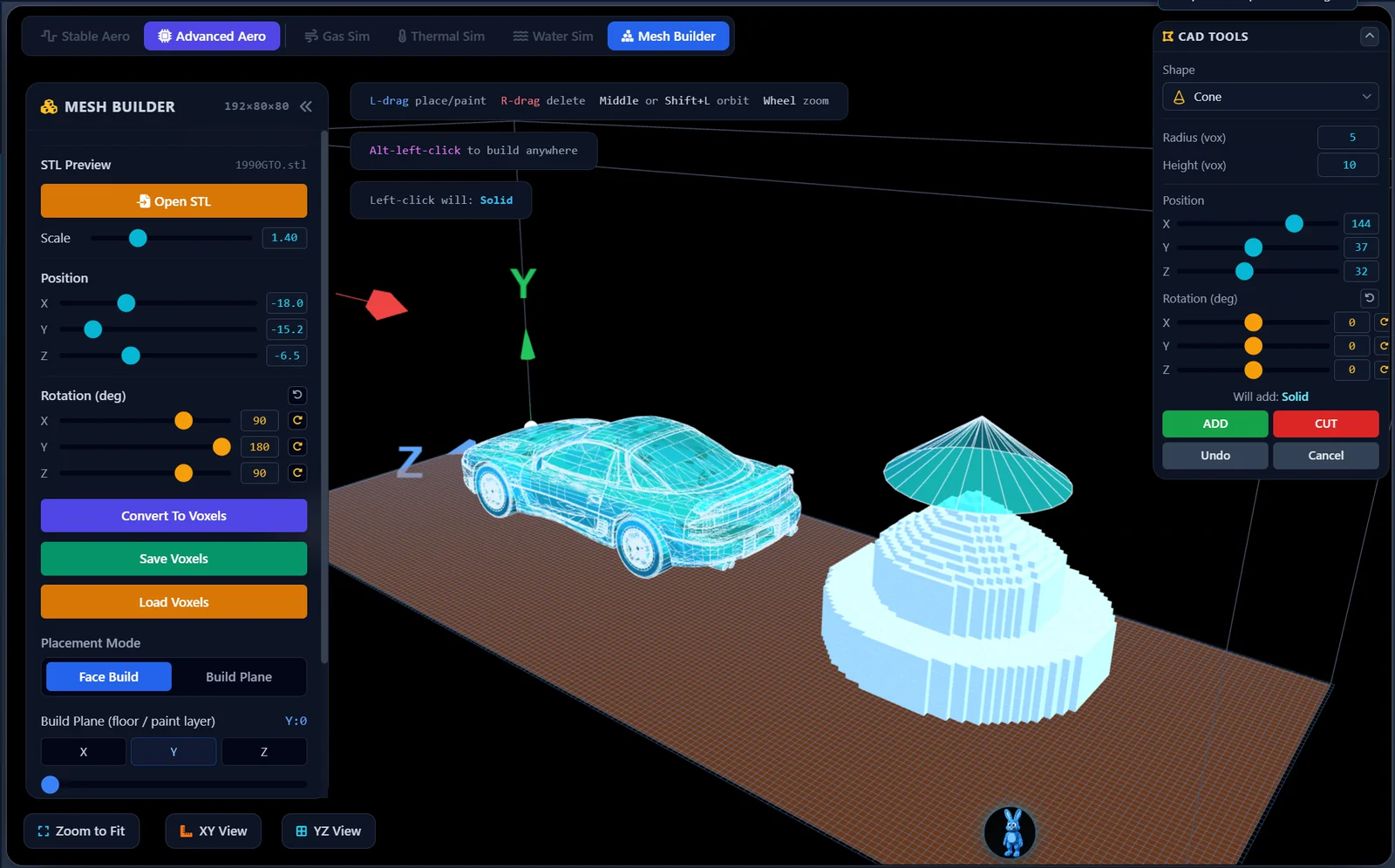
- Load your own STL model, or build one in the Mesh Builder, and try the same questions on your own design.
A stepping stone to professional tools
Visaria is a stepping stone, not a replacement for professional software. It is meant to build the understanding that makes those packages easier to learn and easier to trust.
Visaria uses a coarse voxel grid and solvers tuned for real-time use, so its results are indicative. They are good for seeing what a flow is doing and for comparing ideas, but not for numbers you must defend. For coursework that needs validated results, use a validated tool, and ask your tutor how simulation results should be reported.
Student licences and the free trial
The free 7-day trial includes the Aero, Gas, Thermal and Water solvers, sample access to the Learning Hub and community forum support. It never turns into a paid plan on its own.
Discounted student licences are available on request for people aged 16 and over in full-time education at a university, college, sixth form or equivalent. Email licensing@visaria.dev from your institution address. If you are under 18, a parent or guardian applies and buys for you. Lecturers and teachers can ask about classroom, lab and department licences at education@visaria.dev. See pricing for the standard plans.
What you need to run it
Visaria runs on Windows and needs a dedicated graphics card: an NVIDIA GeForce GTX 1050 or AMD Radeon RX 560 is the minimum, and an RTX 2060 or RX 5600 XT or better is recommended, with an 8th-generation Intel Core i5 (or equivalent) and 8 GB of memory. Mac and Linux versions are coming soon. The free trial is the quickest way to check that it runs well on your computer.
Questions about learning CFD with Visaria
Is Visaria good for learning CFD from scratch?
Yes. It is designed for beginners: you can see real physics running within minutes, without configuring a mesh or understanding solver theory first. The Learning Hub adds step-by-step guides, tool tips, a searchable glossary and parameter reference, so the explanation sits next to the simulation.
Do I need to know the equations first?
No. Many people find it easier to learn the equations after they have seen what the flow does. Visaria shows the behaviour first and explains the terms as you go, so the maths has something to attach to.
Can I use Visaria for my coursework or dissertation?
Use it to understand and explore, and to produce clear images and video of a flow. Its results are indicative, not validated engineering values, so do not present them as accurate measurements. Check with your tutor or supervisor how simulation results should be used in your work.
Is there free CFD software I can try?
Visaria has a free 7-day trial with no payment card. There are also free open-source CFD tools, which are very capable but take longer to learn. Many students use Visaria first for intuition and a professional tool later.
Will it run on my laptop?
It needs a Windows computer with a dedicated graphics card (NVIDIA GeForce GTX 1050 or AMD Radeon RX 560 or better). Many laptops with integrated graphics only will not be suitable. Try the free trial to check before you buy.
Does Visaria do FEA (structural analysis)?
Not yet. Structural FEA, covering forces, stresses and dynamics, is planned as a future new solver. Today Visaria covers aerodynamics, gas mixing, heat transfer and free-surface water.
Keep exploring
Or see all the features, the Learning Hub and the gallery.
Start learning CFD today
The free 7-day trial needs no payment card and includes the Aero, Gas, Thermal and Water solvers.