Give the gift of understanding
A year of Visaria, real-time physics simulation for Windows: a Christmas, birthday or graduation gift for the student, engineer or curious person who loves to see how things work. A STEM gift that is not a toy: one payment, every solver, and nothing for them to cancel.
One year of every Visaria solver for £96, paid once.
Launch offer: £72 with code LAUNCH25 at checkout, until 31 December.
- Their licence key is emailed to the address you enter, now or at a date and time you choose
- Native Windows desktop app (Mac and Linux coming soon)
Secure payment by Paddle. Delivered by email, no postage.
Price is shown in your local currency at checkout, including any VAT or sales tax that applies. Orders are sold by Paddle.com, our Merchant of Record.
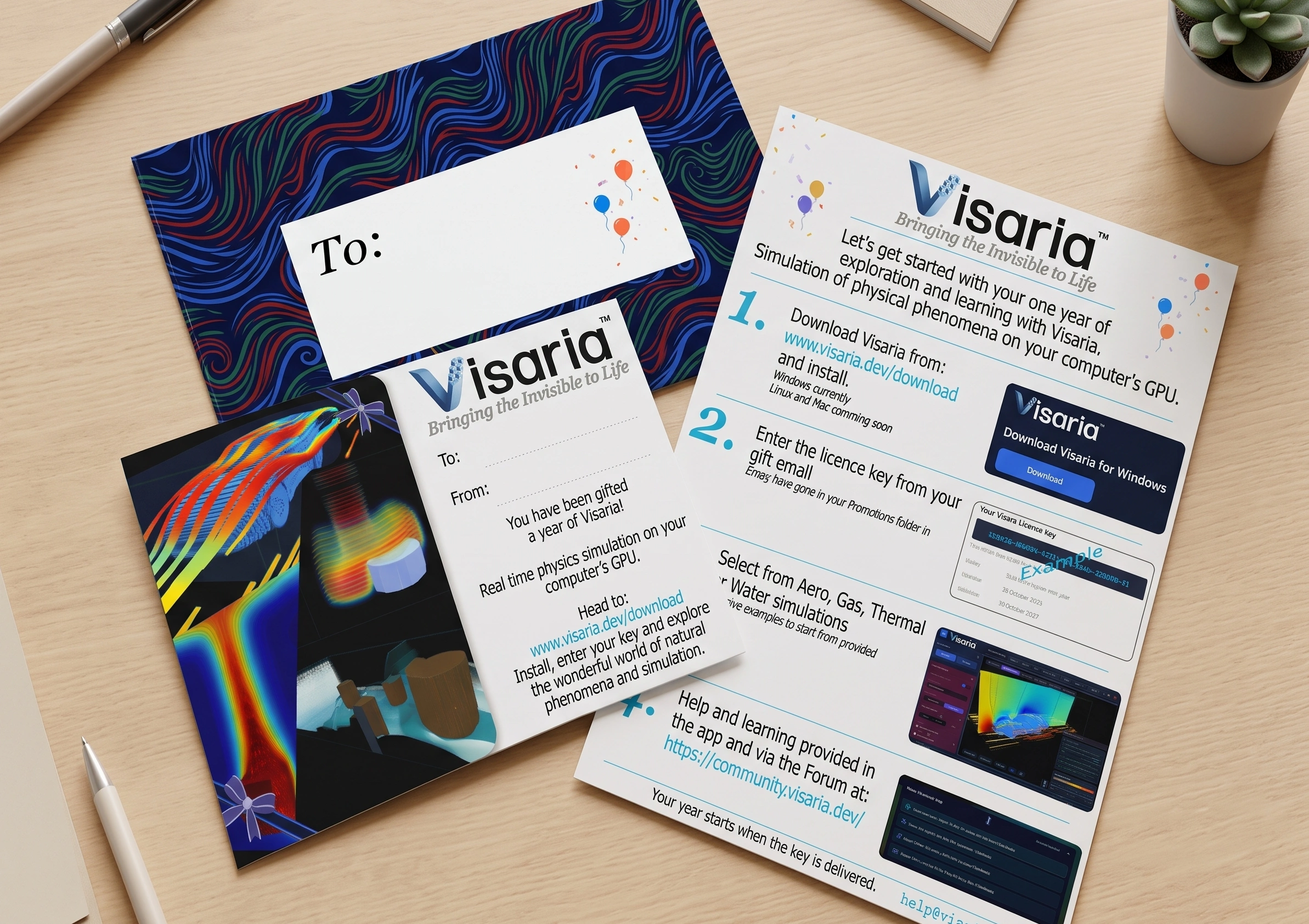
Print-at-home gift materials
Make the gift feel like a gift. Free to download at any time, whether or not you buy: print them on any home printer and write your message.
Gift card
A printable card with space for your message, to tell them a year of Visaria is on its way.
Getting started sheet
A one-page guide to installing Visaria, entering the licence key and how to get their first simulations up and running.
How it works
Buy the gift
Make a single payment through our secure checkout and enter the email address of the person you are giving it to. Choose to send it now, or pick a date, time and time zone. The gift lasts one year and does not renew.
We email their licence
Their licence key is emailed to the address you entered, straight away or at the date and time you chose, so a Christmas gift can arrive on Christmas morning. You receive your own order confirmation.
They start exploring
They download Visaria for Windows from this website, enter the key and begin. You can print a card from the buttons above to give a physical gift and instructions. Do tell them to look out for their key email, and to check Promotions or spam if it does not appear in their inbox at the chosen time.
A gift for students, engineers and curious minds
Visaria turns physics into something you can watch and change: airflow and drag, gas buoyancy, heat and water, simulated in real time in 3D. It is a STEM gift that is not a toy, and one they can keep exploring all year.
Students
Sixth form, A-level physics, university or college. See fluid mechanics and heat transfer instead of only reading about them, with step-by-step guides and a searchable glossary built in.
Engineers and engineering students
Aerospace, mechanical and automotive minds can watch airflow, drag and heat respond as they change the settings, see how their own geometries interact with the flow, and get a real feel for how CFD works.
Makers and hobbyists
Load an STL model of your own design, or build a shape in the Mesh Builder, and see how air, heat and water flow around it.
Anyone who asks “why does that happen?”
Why heat sinks have fins, how powerful buoyancy is, how water sloshes: for anyone curious about how things work, it is more fun and powerful to see it than to be told.
Will it run on their computer?
Visaria is a Windows desktop app that needs a dedicated graphics card: at least an NVIDIA GeForce GTX 1050 or AMD Radeon RX 560. Mac and Linux versions are coming soon, so it is worth checking what they use before you buy.
Not sure? The free 7-day trial needs no payment card and is the quickest way to check that Visaria runs well on their computer, or on one like it.
No graphics card? See how to check and add one.
Questions about gifting Visaria
What is Visaria?
Visaria is real-time CFD (computational fluid dynamics) simulation software for Windows. It shows airflow, drag, gas buoyancy, heat transfer and water in 3D while it solves, and lets you change the settings live. It is an educational and exploratory tool: its results are indicative, not those of a validated engineering solver.
Will it work on their computer?
Visaria is a Windows desktop app and needs a dedicated graphics card: at least an NVIDIA GeForce GTX 1050 or AMD Radeon RX 560. For smooth motion we recommend an RTX 2060 or RX 5600 XT or better, with an 8th-generation Intel Core i5 (or equivalent) and 8 GB of memory. Mac and Linux versions are coming soon. If you are not sure, the free 7-day trial needs no payment card.
How does the recipient get the gift?
When you buy, you enter the email address of the person you are giving it to and choose when it is sent: now, or on a date and time in the time zone you pick, such as Christmas morning. Their licence key and instructions are emailed then. They download Visaria for Windows from this website, enter the key and start exploring. You receive your own order confirmation from our payment provider.
Is it a subscription? What happens after the year?
No. A gift is a one-off payment and does not renew, so there is nothing for them to cancel. As the year nears its end, the app shows them a message pointing them to the Visaria website. When the year ends the solvers stop running, but their scenario files and outputs stay on their computer. If they want to carry on, they can buy a licence from the pricing page.
What is included?
The Pro Bundle: every current solver (Aero, Gas, Thermal and Water) and full access to the Learning Hub. New solvers launched during the year are offered at a significant discount. Structural FEA, adding forces, stresses and dynamics, is planned as a future new solver, which, when available, they can purchase at a significant discount with this gift licence.
Can I get a refund?
Our usual refund and cancellation terms apply; see the Refunds section of the Terms. For any question about an order, email help@visaria.dev.
Can I give it to a class, lab or department?
Yes, that is a great gift to give. Please email us at education@visaria.dev about classroom, lab and department licence gifting. Discounted licences for students and academics are also available on request.