
Download Visaria for Windows
Windows may show a one-time safety screen when you first install. It's expected, and our 2-step guide below takes about 10 seconds.
Seeing “Windows protected your PC”? Two clicks and you're in
Why you're seeing this: Windows shows this screen for installers from publishers it doesn't recognise yet, and Visaria's installer isn't code-signed while we're a new independent developer. It's expected.
-
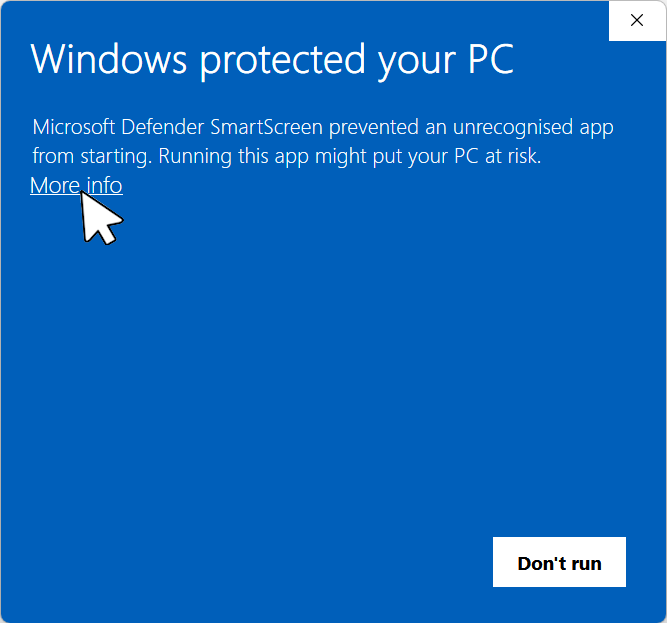
Click “More info”
In the blue “Windows protected your PC” window, click the More info link under the message.
-
Click “Run anyway”
A Run anyway button appears at the bottom of the window. Click it and the installer starts as normal. (Your file name may differ slightly from the one shown.)
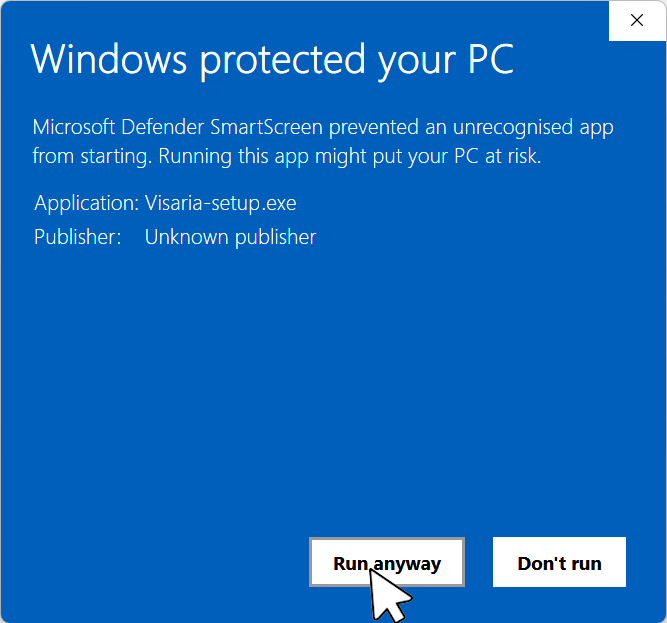
The screenshots are from Windows in English. Your Windows will show the same screens in your own language.
That's all. The Visaria installer opens and you can carry on as usual.
- Temporary: we plan to sign future releases, and when we do this screen will no longer appear.
- Only the first time: once Visaria is installed, its updates are trusted by Windows, so you won't see this screen again.
- Want to be sure? Compare your download's SHA-256 with the published checksum.
No “More info” link, or the installer is blocked completely?
If Smart App Control is on, Windows may block the installer without offering Run anyway. You can turn it off in Windows Security, then run the installer again. Still stuck? help@visaria.dev
- Mac Coming soon
- Linux Coming soon
System requirements
Windows 10 or 11, 64-bit. A graphics card and driver that support WebGPU.
How to install
- Run the installer by double-clicking the file you just downloaded (Visaria-setup.exe). Windows may show a temporary warning first; see the note above.
- Open Visaria. Enter your licence key under the menu: Licences, or start the free 7-day trial.
- To move a paid licence to another computer, open Licences on the old one and press Deactivate (needs an internet connection), then enter your key on the new computer.
Help
Product help: help@visaria.dev
Licence help: licensing@visaria.dev